With a formula the configurator calculates on its own: an area from width and height, an amount from quantity and unit price, a surcharge from a selection. A formula is a characteristic of its own that reads the values of other characteristics and recalculates with every selection. You can display its result, use it in further formulas or add it to the price.
How it works
- Create a characteristic and choose Calculation as Data category and Formula as Data type.
- Under Basic settings, give it a meaningful Internal name (ID), e.g.
area. Other formulas use the result through this name. - Under Formula settings, enter the formula in the Calculation (Formula) field, e.g.
$width * $height / 10000. - If the result should count towards the price, add Tiered pricing – see Add the result to the price.
- Set Visibility to No (hidden) if your customers should not see the result.
- Check the result in the preview with a few test values.
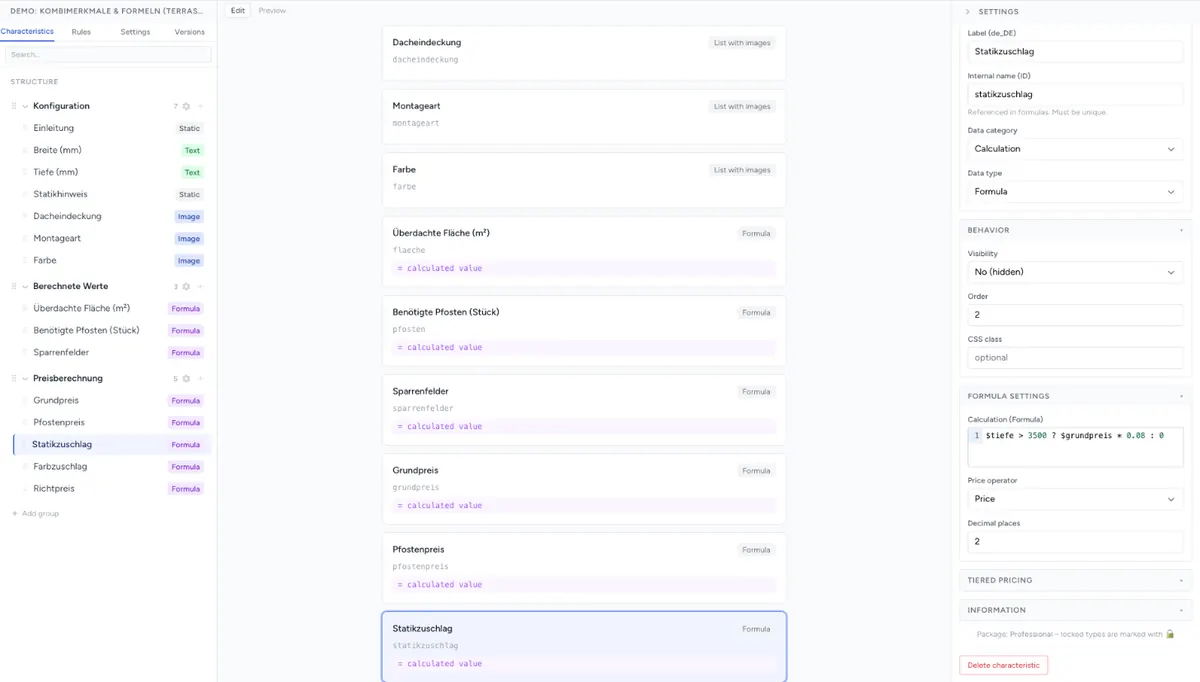
A formula is one JavaScript expression. You don't need programming skills for it – basic arithmetic, brackets and a few functions cover almost everything.
Use characteristics in the formula
You refer to a characteristic through its Internal name (ID) with a leading $. Upper and lower case matter.
| Notation | Result |
|---|---|
$width |
The current value of the characteristic (see the table below) |
$colour.price |
The surcharge of the selected value. With multiple selection, the sum of the selected surcharges. |
$colour.originalPrice |
The surcharge without multiplication by a quantity. In V3 identical to .price. |
$$width |
Like $width. In the Legacy engine, however, the formula does not recalculate when only this characteristic changes – only when one of the others changes. In V3 there is no such difference. |
Which value comes out?
| Characteristic | $name returns |
|---|---|
| Select, Radio buttons, List with images | The Value field of the selected entry – not the label. If the value is a number (120), the formula calculates with it. Otherwise it is text ('wood'). |
| Multi-selection, Checkbox | Legacy: a list of the selected values, e.g. ['led','dimmer']. V3: empty. For surcharges use $name.price. |
| Small / Large input field | The input. Numbers become numbers, also with a decimal comma (12,5 → 12.5). Everything else stays text. |
| Formula, Price list, Simple combination | Their result. This lets you chain formulas. |
| Nothing selected, nothing entered, hidden by a rule | Empty ('') – see Empty fields. |
Calculate, compare, decide
| Symbol | Meaning | Example |
|---|---|---|
+ - * / |
Basic arithmetic | $width * $height |
% |
Remainder of a division | $quantity % 10 |
( ) |
Brackets | ($width + 10) * 2 |
== != < <= > >= |
Comparison | $width > 200 |
&& ! |
and, not | $width > 200 && $height > 150 |
condition ? a : b |
If – then – else | $width > 200 ? 25 : 0 |
Or is written with two vertical bars: $width > 200 || $height > 150 is true if at least one of the two conditions is met.
Careful with ^: in JavaScript this is not a power operator but a bitwise XOR. 2 ^ 3 gives 1, not 8. For powers use Math.pow(2, 3).
You always write if – then with ? :. You can nest several levels:
$quantity >= 100 ? 7.90 : ($quantity >= 50 ? 8.90 : 10.90)Always return a number. A plain comparison like $width > 200 gives 1 or 0 in the Legacy engine, but no result in V3. So write $width > 200 ? 1 : 0.
Functions
The functions with Math. work in both engines. The short forms without Math. only exist in V3.
| Function | Meaning | Short form (V3 only) |
|---|---|---|
Math.round(x) |
Round to a whole number | round(x), with decimal places: round(x, 2) |
Math.ceil(x) |
Round up | ceil(x) |
Math.floor(x) |
Round down | floor(x) |
Math.abs(x) |
Absolute value | abs(x) |
Math.min(a, b, …) |
Smallest value | min(a, b, …) |
Math.max(a, b, …) |
Largest value | max(a, b, …) |
Math.sqrt(x) |
Square root | sqrt(x) |
Math.pow(x, y) |
x to the power of y | pow(x, y) |
Math.log(x) |
Natural logarithm | log(x) |
Math.exp(x) |
e to the power of x | exp(x) |
Math.PI |
The number π | PI |
Round to decimal places in both engines: Math.round(x * 100) / 100 (two places) or Math.ceil(x * 2) / 2 (round up to 0.5).
Spreadsheet-style upper-case functions (ROUND, IF, MAX) do not exist.
One formula, one expression
In V3 a formula consists of exactly one expression. Intermediate variables (var), if blocks, loops and several statements separated by ; return no result there.
The Legacy engine also runs multi-line formulas. So that a component calculates the same in both engines, still write a single expression and split long calculations into several formula characteristics – for example area and, building on it, area_price. That is also easier to check. More on this: Frontend Engine: Legacy or V3.
Empty fields
As long as a characteristic is empty, the formula inserts an empty text. When multiplying and dividing this counts as 0 ('' * 2 gives 0). When adding, however, JavaScript joins texts: if $a is 5 and $b is empty, $a + $b gives the text “5” instead of the number 5. The V3 engine does not add text to the price. You are on the safe side with:
($a || 0) + ($b || 0)|| 0 inserts 0 for an empty field. You don't need this for select characteristics with text values – compare there directly: $colour == 'red' ? 20 : 0.
If a formula causes an error (typo, unknown function), its result is empty or 0. The configurator keeps running.
Add the result to the price
A formula initially only returns a number. It counts towards the price through the formula's Tiered pricing and the Price operator – just like the price matrix:
| Goal | Tiered pricing | Price operator |
|---|---|---|
| The formula is the price (e.g. 49.90) | one tier: value 0, price 1 |
Value × Price |
| The formula is a quantity, e.g. m², multiplied by a price | one tier: value 0, price = price per unit, e.g. 45 |
Value × Price |
| The price per unit depends on the quantity | several tiers, e.g. 0 → 45, 5 → 42, 10 → 38 |
Value × Price |
| Fixed surcharge above a threshold | one tier with the threshold and the surcharge | Price |
Without tiered pricing the formula contributes nothing to the price. How tiered pricing calculates in detail is described in Set Up Pricing.
Decimal places
The Decimal places field in the Formula settings determines how many decimal places the result is displayed with. In the Legacy engine the result is also used further in rounded form, in V3 only the display is rounded. If rounding should affect the price, round in the formula itself, e.g. with Math.round(x * 100) / 100.
Formulas elsewhere
- Price matrix: a formula can serve as Dimension X or Y – for example a calculated area as a row of the table. See Price Matrices from Excel/CSV.
- Simple combination: if you only want to add, multiply or join two or more characteristics as text, the Simple combination data type is enough – no formula needed.
Practical examples
All examples work in both engines. Replace the characteristic names with your own.
Area in m² from centimetres
$width * $height / 10000Area with a minimum area of 0.5 m²
Math.max($width * $height / 10000, 0.5)Round the area up to full 0.5 m²
Math.ceil($width * $height / 10000 * 2) / 2Surcharge from a width of 200 cm
$width > 200 ? 35 : 0Unit price with volume discount × quantity
$quantity * ($quantity >= 100 ? 7.90 : ($quantity >= 50 ? 8.90 : 10.90))Surcharge depending on the selection – the characteristic material has the values wood, alu, steel:
$material == 'steel' ? 1.35 : ($material == 'wood' ? 1.2 : 1)You can use this factor in a second formula: $area * 45 * $material_factor.
Add up the surcharges of several characteristics
$colour.price + $drive.priceCircumference of a round table from the diameter
Math.round(Math.PI * $diameter)With the AI agent
The AI agent writes formulas for you when you describe what should be calculated:
“The price should be width times height in m² times 45 euros, but at least for 0.5 m².”
It creates the formula characteristic and sets up the tiered pricing. Check the result in the preview with a few test dimensions before you publish.
Troubleshooting
- The formula always returns 0 or nothing – is the Internal name (ID) correct, including upper and lower case? Has the characteristic been filled in?
- The formula calculates, but the price stays the same – the Tiered pricing is missing. Without a tier (value
0, price1) and the price operator Value × Price the result does not count towards the price. - A sum is missing from the price as long as a field is empty – the empty field was added as text. Write
($a || 0) + ($b || 0). - A comparison with a selection never matches – the formula sees the entry's Value, not its label.
$colour == 'Red'does not match if the value isred. - No result in V3, but in Legacy – the formula contains
var,ifor several statements, a short form likeround()is missing in Legacy, or it returns a plain comparison. Write one expression with? :andMath.functions. 2 ^ 3gives 1 –^is not a power operator. UseMath.pow(2, 3).- The price is off by a few cents – round in the formula itself instead of via Decimal places.